


King James Bible - Verse+Audio
4.8272.47K Reviews
App Specs
- Version
- 3.75.0
- Updated On
- License
- Free
- Downloads
- 100,000,000+
- Developer
- Ozion
- Categories
- Books & Reference
- Platform
- Android, iOS
Screenshots

 Analysis by AppCompare
I find a Bible app most useful when it makes a small, familiar routine easier rather than trying to replace every other way of reading. King James Bible - Verse+Audio is built around the King James text, with reading, audio, and a daily verse at its center. That gives it a clear purpose: keep scripture available for a quiet moment, a commute, or a quick passage lookup. It is a free Books & Reference app from Ozion, and its straightforward focus will suit readers who want a digital KJV close by.
Everyday reading, listening, and study
I look at this section through the practical question of when a phone is genuinely more useful than a printed Bible: quick searches, a saved place to return to, or audio when reading is inconvenient. The key is choosing the format to suit the moment rather than forcing one routine to do everything. That everyday perspective also helps clarify what the free starting point offers and where paid options enter the picture.
What the free app offers
The app is free to download, with in-app purchases listed from $0.99 to $9.99 per item. That makes the starting point easy to try without paying, but it is worth keeping the distinction clear: the existence of paid items does not tell me which particular extras are included or whether they would matter to your routine. I would begin with the free experience, then decide whether an optional purchase solves a real need rather than paying simply because it is available.
Guides and Analysis on King James Bible - Verse+Audio
Its reach suggests that this format works for many readers: it has more than 100 million installs and an average rating of 4.8 from around 2.5 million ratings. Those figures are useful context, not a promise that every feature will fit every person. The app is rated for Everyone, and version 3.64.0 supports devices running Android 7.0 or later. If you use iOS, check the relevant store page for availability and compatibility before planning your setup.
Text and audio for different moments
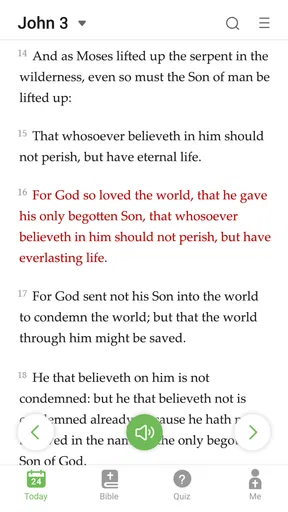
First off, the app offers both text and audio versions of the Bible. Whether you're on the go or just prefer to listen, this feature is a game changer. I found the audio quality to be top-notch, narrated in a way that feels soothing and engaging. You can easily switch between reading and listening without missing a beat.
That combination is especially handy when your attention or hands are occupied: listening can make a familiar passage accessible while walking or doing a simple task, while text is better when you want to pause over a sentence. I would not treat audio as a substitute for close study, though. Names, phrasing, and the older vocabulary of the KJV can be easier to examine on screen, where you can slow down and reread. A practical habit is to listen first for the flow, then open the text for a line that catches your attention.
The King James wording is part of the appeal and also a real consideration. Readers who grew up with it may find its rhythm familiar and meaningful. Someone new to the Bible, or someone who prefers contemporary language, may need more effort to follow its phrasing. In that case, a modern-language translation can be a better companion for understanding, even if this app remains useful for hearing or comparing the KJV.
Worth Reading Before You Choose

QuizzLand Review: A Good Fit for Short Trivia Breaks, Not Every Player

Basketball Stars: Multiplayer Is Fast, but Can It Recover When Matches Go Wrong?

WEBTOON Turns Phone Updates Into a Better Reading Routine

Link to Windows Runs on Shared Habits, Not Social Feeds

How Alibaba.com Dominates the B2B Marketplace

Metro's Quiet Rise: Redefining Mobile Communication
A small daily prompt, used on your terms
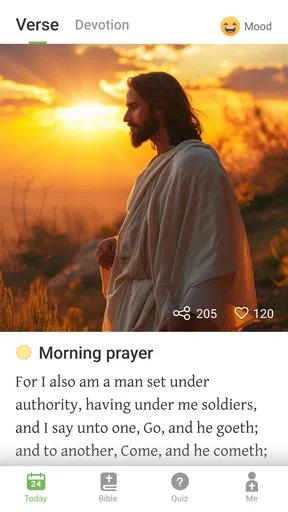
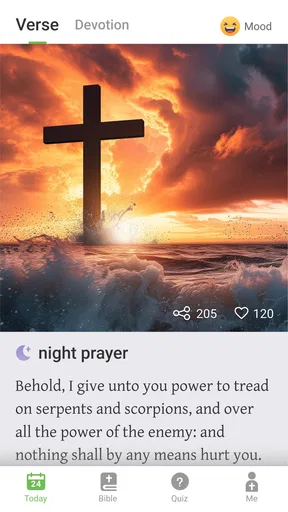
Another standout feature is the daily verse notification. Every morning, like clockwork, you'll receive a carefully selected verse to start your day. It's a simple touch, but it goes a long way in keeping your spiritual journey on track. Plus, the app allows you to share these verses with friends, spreading a little daily inspiration.
A daily verse works best as a prompt, not as a complete reading plan. I would use it to choose a passage to revisit later, rather than assume that one selected line gives the full context of a chapter. If a notification lands during work, you can leave it for a break; if reminders interrupt your day, turn them off or adjust notification settings at the device level. That flexibility matters because a spiritual routine should feel intentional, not like another stream of alerts to clear.
Sharing is useful when a friend asks what you have been reading or when a verse naturally fits a conversation. I would still add a sentence of context when sending one, especially if the recipient may not know the passage. A short excerpt can be encouraging, but the surrounding chapter often changes how a line is understood.
Finding passages and making reading comfortable
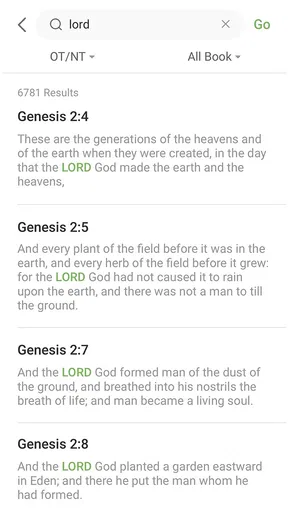
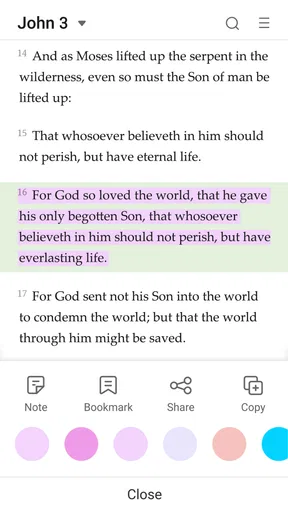
The app’s interface is clean and intuitive. Even if you’re not super tech-savvy, navigating through different books or chapters is a breeze. I appreciated the search functionality, which makes finding specific passages a piece of cake. And with the option to bookmark favorites, you can easily return to passages that speak to you.
Search and bookmarks become more valuable when you use them with a little structure. For example, if you are preparing a discussion, search for a phrase you remember, then bookmark the passage so you can return to the full chapter rather than relying on a fragment. If you are reading for yourself, bookmarks can mark a stopping point or a question to look into later. I find that more useful than saving every line that sounds memorable, which can quickly make a favorites list hard to navigate.
Customization is another area where this app shines. You can adjust font sizes for comfortable reading and choose between different themes. Whether you like a dark mode for nighttime reading or a classic look during the day, the choice is yours.
These settings are not merely cosmetic if you read for more than a few minutes at a time. A larger type size can make a passage less tiring to follow, while a darker theme may be more comfortable in a dim room. For a focused session, I would set the display once before starting, then avoid tinkering mid-reading. The trade-off is that no display setting makes a small phone ideal for long study sessions; a larger screen or a printed Bible may be more comfortable when you want to compare several passages at once.
Where it fits among Bible resources
Compared with a printed KJV, a phone app is easier to carry, search, and use for a quick lookup, but a physical Bible avoids screen distractions and is often easier to read for a long stretch. Compared with a general Bible app that offers several translations, a KJV-focused option keeps the experience centered on one traditional text. That is a strength if the KJV is what you want; it is a limitation if you regularly compare translations or rely on extensive reference material.
For broader study, I would pair the app with a trusted commentary, a study Bible, or a group discussion rather than expect a pocket reader to answer every interpretive question. A search result can show where a phrase appears, but studying a passage still means reading its surrounding verses and considering its context. This app can help you get to the text quickly; it should not be mistaken for a substitute for thoughtful interpretation.
Community tools and guided routines
One of the more unique aspects of the King James Bible - Verse+Audio app is its community feature. You can join discussion boards and connect with other users. It’s like a virtual Bible study group where you can share insights and ask questions. It's a fantastic way to deepen your understanding and connect with others.
Discussion can add perspective, particularly when a passage is difficult or when you want to hear how another reader approaches it. I would treat posts as conversation rather than authoritative guidance: compare claims with the text, and use a trusted teacher or reference source when an important doctrinal question needs careful attention. People also differ in their traditions and assumptions, so respectful disagreement is part of using a community space well.
In addition, there are devotional plans and study guides available. These resources make it easier to organize your reading and study schedule, ensuring you get the most out of your time with the app.
A plan can be a helpful nudge when you want consistency but do not know where to begin. One realistic routine might be to read a short section at breakfast, save a question as a bookmark, and return to it later when you have time to think. If a plan starts to feel like a checklist, slow down or choose a smaller goal. The app can organize a routine, but the useful pace is the one you can sustain.
Who is likely to get the most from it?
I would recommend it most to readers who specifically want the KJV in a portable format, people who like alternating between listening and reading, and anyone who benefits from a daily nudge or bookmarks. It also makes sense for someone who wants to look up a passage quickly without carrying a separate book. Since it is free to start, trying it for a week of ordinary use is a sensible way to see whether the interface and reading style suit you.
It is less compelling for someone who wants a modern translation as their main text, detailed academic tools, or an uninterrupted reading environment. If you often study several translations side by side, a multi-translation resource may serve you better. If you are easily pulled away by phone notifications, a paper Bible could be the better choice for quiet reading. Those are not failures of this app; they are cases where a different tool better matches the task.
Final thoughts
All in all, the King James Bible - Verse+Audio app is a solid choice for anyone looking to bring the Bible into their daily routine. It’s packed with features that cater to both casual readers and those looking for a more in-depth study experience. Whether you're a lifelong believer or just curious, this app is a fantastic tool for spiritual growth.
So, if you're ready to dive deeper into the scriptures or simply need a little daily inspiration, give this app a try. It's like carrying a little piece of peace and wisdom wherever you go.
Pros
- Easy-to-navigate interface for quick access.
- Offers offline access for uninterrupted reading.
- Audio feature enhances user experience.
- Daily verse notifications for inspiration.
- Customizable reading plans available.
Cons
- Contains ads that may disrupt reading.
- Audio feature requires stable internet.
- Limited customization for text display.
- In-app purchases can be frequent.
- Some features not available offline.
FAQs for King James Bible - Verse+Audio
What features does the King James Bible - Verse+Audio app offer?
The King James Bible - Verse+Audio app provides a comprehensive suite of features including daily verses, audio readings, and offline access. Users can bookmark favorite passages, create personalized reading plans, and engage with community discussions. The app also offers verse sharing on social media and customizable themes for a tailored reading experience.
Is the audio feature available offline?
Yes, the King James Bible - Verse+Audio app allows users to download audio files for offline listening. This is particularly useful for those who wish to listen to scripture on the go without worrying about internet connectivity. Simply download your desired chapters when connected to Wi-Fi to save on mobile data usage.
Does the app support multiple languages?
While the primary focus is on the King James Version in English, the app includes options for other translations and languages. Users can switch between versions and languages in the settings menu. However, availability may vary based on the specific translation and language selected, so it's advisable to check the app's language settings.
Are there any in-app purchases or ads?
The King James Bible - Verse+Audio app is available as a free download with optional in-app purchases to unlock premium features like additional audio voices and exclusive content. The free version includes ads, but users can opt for a premium subscription to enjoy an ad-free experience and access to enhanced features.
How user-friendly is the app for beginners?
The app is designed with beginners in mind, offering an intuitive interface and easy navigation. New users can start with daily verses or guided reading plans. The clean layout and helpful tutorials ensure a smooth start, making it simple for anyone to explore the Bible's teachings and integrate them into daily life.


